
Section 01 · Getting Started
01Welcome & How to Use This Guide
Instinct is a research tool. For every company in your market it builds a deep, always-current profile — who they are, what they sell, how they show up online, and how mature their business looks — so that before you ever pick up the phone or write an email, you already know the account. This guide shows you how to find your way to any company and read everything Instinct knows about it.
What Instinct is
Instinct is the Fox & Crow Sales Intelligence Platform. Think of it as a giant, structured filing cabinet: one folder per company, each folder packed with what a good analyst would have spent hours gathering — the company's website and pages, its domains and email setup, the technology it runs, its social profiles and reviews, its people, and a set of scores that summarize how established the business is. You don't have to collect any of this. Fox & Crow collects and refreshes it behind the scenes; your job is to read it, filter it, and act on it.
Instinct is a place to look, not a place to file
Unlike your CRM, Instinct is mostly a reading tool. You search and filter to find the right companies, then open a company to study it. You won't spend your day typing records into Instinct — you'll spend it pulling insight out.
How a company's information is organized
Everything in Instinct hangs off the Company. A company record gathers together several kinds of information, and each kind also has its own list you can browse directly:
- Contacts — the people at the company: names, titles, and verified email and phone where we have them.
- Domains — the web domains the company owns, with their DNS records, email-security setup, and health.
- Web pages — individual pages we've crawled from those domains, with their content, history, links, and screenshots.
- SERP results — what search engines return for the company and its topics.
- Signals & scores — dozens of public signals (hiring, compliance mentions, social presence, SEO readiness, and more) that roll up into two headline scores: the Fox Crow Maturity Level and Territory Health (both explained in Section 08).
You can start from either end. Browse the Companies list and drill into one company to see all of the above in one place, or open the Domains, Webpages, or SERP Results lists to work across every company at once. Part 3 covers the company profile tab by tab; Part 4 covers the web-intelligence lists on their own.
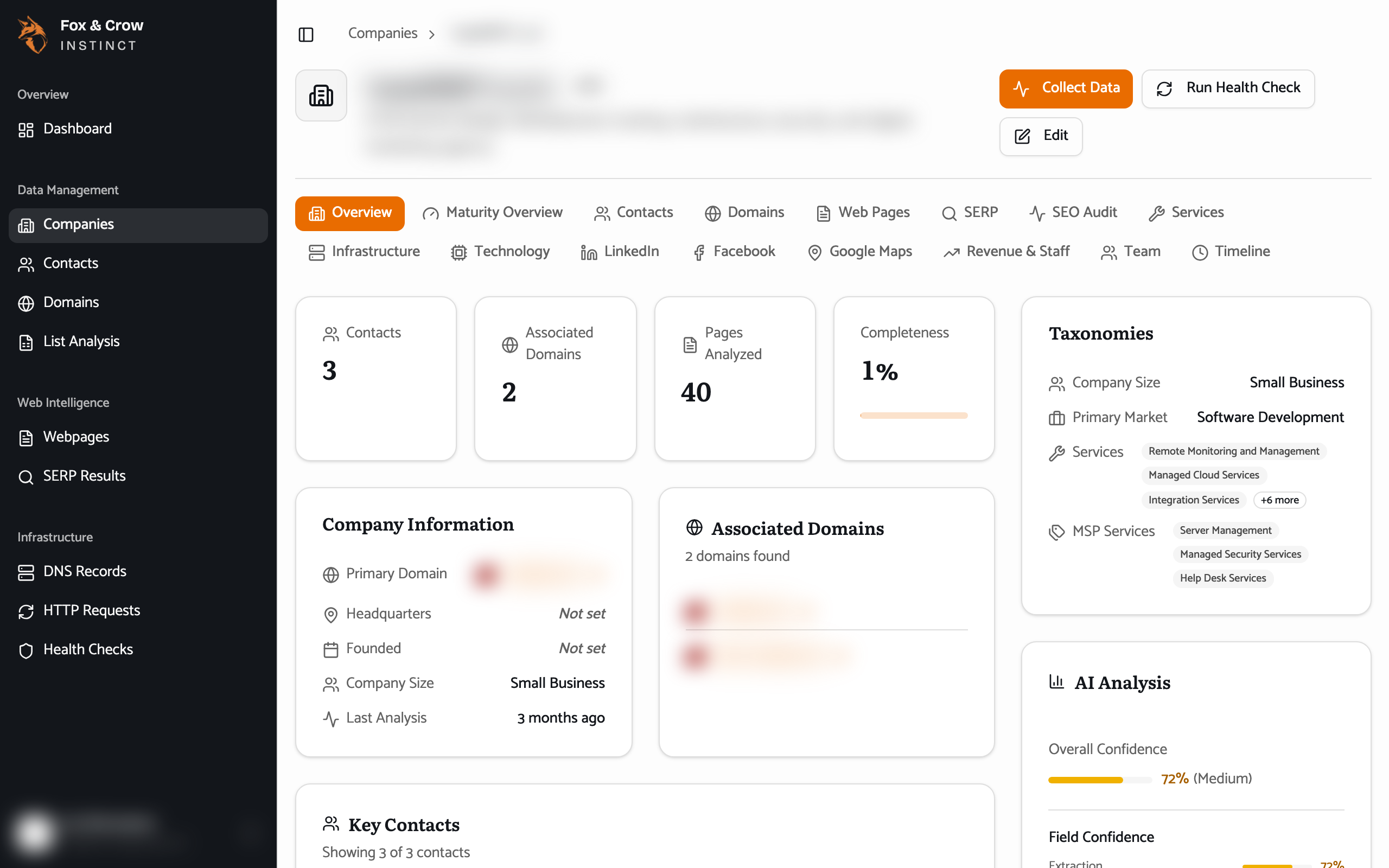
Figure 1.1A company profile. The header and tabs run across the top, the summary cards (taxonomies, AI analysis, and scores) sit down the right, and each tab opens a different slice of what Instinct knows.
What you'll see may differ
Instinct is tailored to each organization, so a few things in this guide may look slightly different for you:
- Your organization's name and colors appear in place of the demo's.
- Some areas can be turned on or off for your organization. If a section this guide describes — for example Contacts — isn't in your navigation rail, it simply isn't enabled for you.
- A handful of buttons (such as Collect Data or Run Health Check) are there for a future release. If you click one and nothing happens, that's expected — the data you see is collected for you on a schedule, not on demand.
How to use this guide
Read Part 1 and Part 2 first — they get you signed in, oriented, and fluent in the searching and filtering that every list in Instinct shares. After that, jump to whatever you need. A few conventions:
- Text styled like This is something you click or a place you navigate to. Text styled like This is the name of a field or a value on screen.
- Every figure is a real screenshot of Instinct, using fictional demo data — company names, websites, and contact details are blurred on purpose.
- Tip and warning boxes call out the things worth remembering. The Glossary (Section 18) defines every score, signal, and term, so you never have to guess what a word means.
The bottom line
One folder per company, already filled in.
Instinct hands you the research a whole analyst team would have gathered. Learn to find and filter companies, then learn to read a profile — and every account walks in already understood.